A free WiFi hotspot software that’s easy to use

Everyone has probably experienced the struggle of needing a WiFi signal but not having a WiFi router around to get it. If you happen to be one of the unlucky ones then OSToto Hotspot can solve your problem. OSToto Hotspot can easily turn any of your non-mobile devices into a WiFi hotspot. Whether you’re using a desktop or laptop, you’ll be able to use WiFi with ease with the OSToto Hotspot.

All About Efficiency

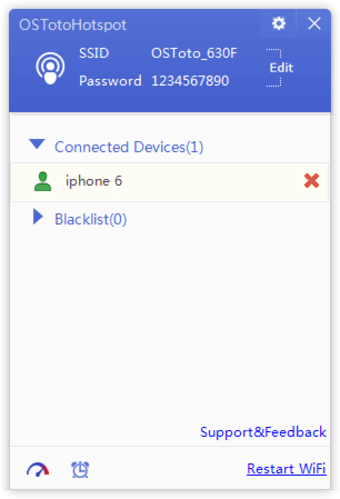
OSToto Hotspot was formerly known as 160WiFi but other than the name change, OSToto Hotspot continues 160WiFi’s legacy without much difference. Installing the program doesn’t take a long time. In fact, it installed as soon as the file is clicked. Once launched, you’ll see the white and purple interface that’s been there since the 160WiFi days. OSToto Hotspot’s interface is minimalistic. The program takes up a really small part of your screen so it doesn’t get in the way of your other work. Aside from a pop-up setting menu at the right-hand corner of the screen, most of the necessary options that you’ll likely need are already displayed. 

It should be mentioned that the program needs a wireless adapter in order to work. However, once a wireless adapter has been installed, using the software is pretty much smooth sailing. You’ll be able to see all of the devices connected to the hotspot. You can also choose to blacklist any unwanted devices. These devices will be listed in the “Blacklist” section of the program. 

Security and Customization

OSToto Hotspot’s security options are rather limited, however. Of course, it’s possible to secure your connection with a password, but that’s about it. Its customization options are also quite rudimentary. Users can choose to change the program's actions during start-up, sending and receiving of notifications, and update the driver version. Other than those listed above, OSToto offers no other menus for customization. Despite these drawbacks, OSToto is still a great utility tool for people who need to turn their devices into portable WiFi hotspots.

One nitpicky drawback is the automatic minimization of the window to the tray. There is no option to disable this feature. However, this is a rather minor issue and would just take a little bit of getting used to on the part of the users.

Simple, but Effective

There’s no denying that the OSToto is a simple program. It has a simple interface and simple menus. It’s undoubtedly a good fit for users who aren’t technologically savvy. All it needs is a wireless adapter and users are pretty much ready to go. Still, that very simplicity can also be its drawback as it also lacks a lot of features. Don’t expect a lot of high-level functions. As long as a portable WiFi is all you need then OSToto Hotspot can definitely fulfill your needs.


  • Pros

    • Installing the program is easy
    • Minimalist interface
    • Performs its function well
    • Good for beginners
  • Cons

    • Does not offer a lot of security options
    • Customization is limited
    • Localization is not polished
    • Automatically minimizes to the tray
 0/1

App specs

  • License

    Free

  • Version

    4.4.0.4
  • Latest update

  • Platform

    Windows

  • OS

    Windows 8.1

  • Language

    English

  • Downloads

    309.8K

    Last month's downloads

    • 478
  • Size

    4.67 MB

  • Developer

Program available in other languages


User reviews about OSToto Hotspot

3.8

8 reviews

Add review

Main reviews for you

  • Anonymous user

    Nice softwer very nie softweer cool help full thanks soo mucnh team

  • Anonymous user

    Best Hotspot solution for Windows10 . Oh my...you cannot imagine my excitement after searching the web for weeks to get my hosted network running. From nestsh wlan to ICS to network adapter updates..I was giving up. Thank you! Its all I can say.Wonderful app Pros: Simplicity Cons: Can't find any at the moment

  • Anonymous user

    Best software for hotspot for windows 10 upgraded laptops. great one... after a futile attempt of trying every software and method online to start hotspot on my windows 7 to 10 upgraded laptop, this software was a game winner .. I am very happy that all my efforts didn't go in vain as it started working today, hope it continues to work....

  • Anonymous user

    The best program for Windows computer WiFi hotspot!. The best program for Windows computer WiFi hotspot! I used it to make a free wifi hotspot on my windows 10 laptop! I think it is better than the default way in Windows! Pros: Easyfreeware Cons: nothing

  • Anonymous user

    Works great.. Quite easy to create the wifi hotspot. I can blacklist someone and cancel it. I like this function. Pros: Easy to createSecurity Cons: N/A

  • Anonymous user

    The best software for me to create a free WiFi hotspot in my Windows 8 PC. The best software for me to create a free WiFi hotspot in my Windows 8 computer. Pros: One click to turn on WiFi hotspot! Cons: nothing!

More

You may also like

Alternatives to OSToto Hotspot

Explore Apps

Latest articles

Laws concerning the use of this software vary from country to country. We do not encourage or condone the use of this program if it is in violation of these laws.
Softonic

Is OSToto Hotspot safe?

100/100

Score result: Clean

This file passed a comprehensive security scan using VirusTotal technology. It is safe to download.

  • Virus free
  • Spyware free
  • Malware free
  • Verified by Security Partners

    VirusTotal logo

Scan Info

Last scan
Tuesday, August 27, 2024
Scan provider
VirusTotal · Full report

File Integrity

File
OSToto_Hotspot_V4.4.0.4.rar
SHA256
0435e09470929b5dbd9d9c943aedd0a55ba454bb31b703cf3ec3d8f825b2d51f
SHA1
a6e6ae5e01f155d27543620f4f21a446613aa255

Softonic security commitment

OSToto Hotspot has been thoroughly scanned by our advanced security systems and verified by industry-leading partners. This file comes from the official developer and has passed all our security checks, showing no signs of viruses, malware, or spyware. For more information, visit our Security and Trust Center